
What Is Photo Retouching? A Beginner-Friendly Guide with Real-Life Insights
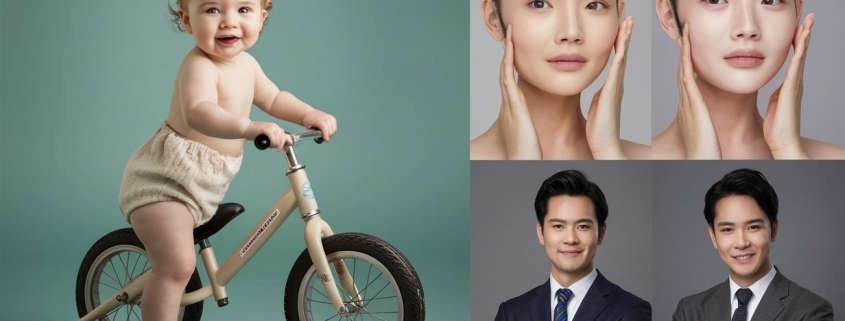
Let’s be honest we all want our photos to look amazing. Whether it’s a selfie on Instagram or a product photo for your online store, we want people to stop scrolling and actually look. I remember my first time editing a photo for a friend it was her wedding portrait, and she just wanted to “look like herself but on her best day.” That’s when I realized what photo retouching services really are: enhancing what’s already there without making it feel fake.
In this article, I’ll walk you through what photo retouching is, how it’s different from general editing, why it matters, and how it can completely transform your images. I’ll share stories from my work at Expert Clipping, walk you through real techniques, and even include customer reviews to show you the impact of a well-retouched photo.
What Is Photo Retouching?
Photo retouching is like giving your photos a gentle makeover. It’s the process of cleaning up or enhancing an image to look its best—removing blemishes, smoothing skin, fixing lighting issues, or even replacing backgrounds.
While photo editing can include basic tasks like cropping or adjusting brightness, photo retouching goes deeper. It zooms in on the tiny details that make a photo feel polished.
👉 Short answer: Photo retouching is detailed image enhancement that improves photo quality without changing the original feel.
I got my start in photography retouching by editing portraits for a local photographer. The joy on clients’ faces when they saw their edited photos? Priceless.
Photo Retouching vs. Photo Editing
A lot of people use these terms interchangeably, but there’s a difference:
| Task | Photo Editing | Photo Retouching |
|---|---|---|
| Cropping | ✔ | ❌ |
| Exposure Adjustments | ✔ | ❌ |
| Color Correction | ✔ | ✔ |
| Skin Smoothing | ❌ | ✔ |
| Blemish Removal | ❌ | ✔ |
| Background Replacement | ❌ | ✔ |
👉 Photo editing is general; retouching is focused and detailed.
Think of editing as washing your car, and retouching as waxing it until it shines.
Why Is Photo Retouching Important?
Let me tell you—first impressions online are everything. Whether you’re selling a product or sharing a portrait, a polished image builds trust instantly.
Professional photo retouching is important because:
- It helps products sell faster.
- It makes people look their best.
- It brings out the best in any photo.
📸 I remember one client who ran an Etsy jewelry store. After we retouched her product images, her conversion rate tripled. That’s the power of image enhancement.
Common Photo Retouching Techniques
Here’s where the magic happens:
- Skin Smoothing: No one wants a plastic look. We keep the texture, just soften imperfections.
- Blemish Removal: Say goodbye to pimples or unwanted scars.
- Teeth Whitening & Eye Brightening: A small tweak goes a long way.
- Hair Retouching: Tame flyaways, boost shine.
- Object Removal: Photobomber? Dust spot? Gone.
- Background Replacement: Transform an image without reshooting.
👉 Short answer: Common retouching techniques clean, enhance, and refine photos without losing their natural look.
Can You Change the Background of a Photo?
Absolutely and we do it all the time at Expert Clipping. Whether it’s putting a white background for Amazon or a dreamy field for portraits, background replacement is one of the most requested services.
👉 Yes, the background of a photo can be changed using professional tools like Photoshop.
It’s like picking the perfect frame for a painting—backgrounds matter more than you think.
Tools I Use at Expert Clipping
At Expert Clipping, we blend creativity with the right tech tools. My go-to favorites:
- Adobe Photoshop – For detailed work like skin retouching and object removal.
- Lightroom – Ideal for color correction and lighting.
- Healing Brush Tool – Magic wand for blemishes.
- Liquify Tool – Subtle reshaping when needed.
- Photo Editor Apps – For quick mobile fixes.
👉 Short answer: We use Photoshop, Lightroom, and healing tools to achieve pro-level photo retouching.
Who Needs Photo Retouching Services?
You’d be surprised how many people benefit from this. Here are the top groups:
- E-commerce Stores – Clean, sharp product photos drive more sales.
- Fashion Photographers – Retouching brings out fabric texture and model beauty.
- Event Photographers – Weddings, graduations—these are once-in-a-lifetime shots.
- Social Media Influencers – A polished feed boosts engagement and brand deals.
👉 Short answer: Anyone who relies on high-quality images especially for business can benefit from photo retouching.
My Step-by-Step Workflow
Want to know how we do it at Expert Clipping?
- Basic Edits – Crop, adjust exposure and color.
- Retouching – Zoom in for blemish removal, smoothing, detail fixing.
- Final Review – Check natural feel and export in client-requested format.
It’s kind of like preparing a meal—you start with prep (editing), cook (retouch), then plate it beautifully (final export).
Industry Applications of Retouching
Portrait Photography
Skin smoothing, eye enhancement, and natural tones make people feel confident and seen.
Fashion Photography
Perfect folds, glowing skin, and flawless backgrounds—retouching is the backbone of every fashion magazine.
Product Photography
From watches to sneakers, we remove dust, adjust lighting, and ensure consistency across all images.
👉 Short answer: Photo retouching improves quality and appeal across portraits, fashion, and product photography.
Is Photo Retouching Ethical?
It can be, when used responsibly.
We believe in enhancing, not deceiving. Our goal at Expert Clipping is to make photos look polished, not fake.
👉 Short answer: Ethical photo retouching enhances reality without altering it beyond recognition.
Customer Reviews: What People Say
Here’s what some of our clients at Expert Clipping have shared:
| Customer | Review |
|---|---|
| Sarah M. (Wedding Photographer) | “I’ve used Expert Clipping for all my bridal shoots. The skin tone edits are so natural, my clients cry happy tears!” |
| Jason T. (Amazon Seller) | “I saw a 40% increase in clicks after switching to retouched images. Best investment ever.” |
| Aria B. (Influencer) | “They removed a street pole from my background and saved my whole post. Total lifesavers!” |
How Much Does Retouching Cost?
It depends on the complexity. At Expert Clipping, we offer:
| Type | Cost per Image |
|---|---|
| Basic Retouch | $1.00–$3.00 |
| High-End Beauty Retouch | $5.00–$10.00 |
| Background Removal + Retouch | $3.00–$7.00 |
👉 Short answer: Basic photo retouching service costs start at just $1 per image. See pricing plans.
Do All Photographers Use Retouching?
Not all, but most professionals do—especially in fashion, weddings, and commercial shoots. Even journalists apply light retouching for clarity (ethics depending).
👉 Short answer: Most pro photographers use retouching, though how much depends on the field.
Try Retouching Yourself or Hire a Pro?
You can learn the basics yourself with apps and tutorials. But for high-stakes images (like wedding albums or product listings), it’s smart to go pro.
At Expert Clipping, we’ve helped thousands of clients look their best—without breaking the bank.
Conclusion + Final Thoughts
Photo retouching isn’t just about making things “pretty.” It’s about capturing the best version of what’s already there. Whether it’s removing a pimple or replacing a cluttered background, these subtle changes can make a huge impact.
If you’ve got a photo that means something to you—or your business—don’t settle. Either try it yourself or let pros like us at Expert Clipping handle it.
👉 Need help? Drop your image in the comments or get a free quote!
FAQs
1. What is photo retouching in Photoshop?
Photo retouching in Photoshop involves detailed enhancements like blemish removal, skin smoothing, and object removal using tools like Healing Brush and Liquify.
2. What are the benefits of photo retouching?
Retouching makes photos look clean, professional, and eye-catching—great for personal keepsakes or online sales.
3. Is photo retouching ethical?
Yes, when done to enhance (not deceive), it’s ethical and often expected in professional photography.
4. Can I do photo retouching on my phone?
Basic retouching is possible on apps like Snapseed or Lightroom Mobile, but advanced edits usually require desktop tools.
5. How long does it take to retouch a photo?
Basic edits take 5–15 minutes, while high-end beauty retouching can take up to 1 hour depending on detail leve